


 Sep 24, 2026
 Leonardo da Vinci was left-handed. So was Mozart, Napoleon, Marilyn Monroe, and Bill Gates. An impressive list, though it won’t help them much when they’re trying to tap the “Complete Purchase” button sitting in the far right corner of a mobile screen.
Roughly 10% of the world’s population is predominantly left-handed. Yet most of the internet – most apps, most user interfaces – is built on one quiet assumption: the user is holding their phone in their right hand.
The question this article asks isn’t just playful — it’s a serious design question: does your website punish the person who was born left-handed?
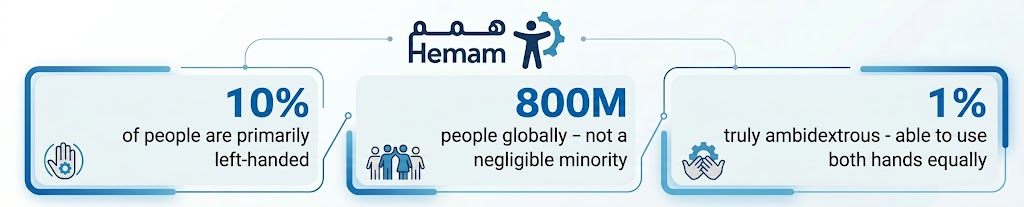
Source: Smashing Magazine – Vitaly Friedman (July 2025) · Ruben Babu, Medium
I. The Difference Between “Left-Handed” and “Left-Handed User”
Here’s the first surprise: being left-handed doesn’t necessarily mean being a left-handed user. After a lifetime of adapting to a right-hand-oriented world, many left-handers use their right hand for a mouse and keyboard, because they were trained to from childhood. What remains genuinely different is mobile interaction, where users are free to hold their phone in their actually preferred hand.
And that’s where the real problem emerges: mobile design frequently concentrates interface elements in zones most comfortable for a right thumb – the lower right corner, primary buttons on the right – which makes the experience meaningfully harder for someone holding their phone in their left hand.
II. Real Situations Where Left-Handed Users Struggle
| 📱 The “Delete” button in an app |
| In a list or shopping cart application, the delete button sits at the far right. A left-handed user must stretch their thumb across the entire screen — or switch hands — to complete an action that a right-handed user performs effortlessly with a natural tap. |
| 🔽 The three-dot menu in the top right corner |
| The “⋮” overflow menu icon in the top right of the screen — the standard position in Material Design and beyond — requires a left-handed user to strain their thumb to the most distant point on the screen, or switch to the other hand entirely. |
| 💳 Online payment forms |
| Card number fields running left to right with a “Confirm” button in the far right. A user holding their phone in their left hand repositions their hand three or four times before completing what should be a simple transaction. |
III. Why “Design for Everyone” Doesn’t Mean “Design for the Right”
In July 2025, Vitaly Friedman – one of the founders of Smashing Magazine and a leading authority on UX design – published an academic piece titled “Designing Better UX For Left-Handed People.” Its central conclusion:
“Our aim isn’t to degrade the UX of right-handed users to serve left-handed users. The aim is to create an accessible experience for everyone. Better design for left-handed people also benefits anyone using a device with their left hand temporarily due to a disability or injury.”
That last point matters enormously: someone holding a baby in their right arm while browsing with their left, someone with a cast on their right hand, someone eating while scrolling; all of them are living the “left-handed user” experience temporarily. Inclusive design serves all of them.
IV. What Actually Makes a Design Difference?
The solution isn’t a separate “left-handed mode.” It’s smart design decisions that work for everyone. Here’s what the research says:
| Design Decision | Less Inclusive | More Inclusive |
| Primary button position | Bottom right only | Bottom center or switchable left/right |
| Mobile action menu | Top right — fixed | Bottom center or user-customizable |
| Tap target size | Small 24px buttons | Minimum 44px (works for all hand sizes) |
| Thumb travel distance | Stretched to screen edge | Within the natural thumb reach zone |
| User customization | None available | Lets the user set left or right preference |
V. A Simple Test — Try It Right Now
Researchers call this the “Opposite-Handed UX Test” – or the “Left-Handed Oil Test” for physical products. The concept is simple: hold your phone in your non-dominant hand, and try to complete the key tasks in your website or app.
| How to Run the “Non-Dominant Hand” Test |
| Hold your phone in your less-preferred hand and try to complete a purchase or login flow. |
| Notice: which buttons are hard to reach with your thumb from this position? |
| Watch: do you have to readjust your grip or switch hands to complete any step? |
| If the answer is “yes” for more than one step – there’s something worth reviewing. |
The Bottom Line: Good Design Goes Unnoticed Because It Works for Everyone
The best user experience is one where nobody feels it was designed specifically for them, because it feels natural for everyone. The button in the right place, the right spacing, tap targets large enough; these are design decisions that serve right-handed and left-handed users and everyone between them.
The beautiful irony: when you design for left-handed users, you automatically design for everyone who holds their phone in an unconventional way. And according to usage research, that’s more people than you’d expect.
Inclusive design doesn’t mean pleasing everyone. It means no one feels the site was built against them.
Accessibility features on your website don’t only serve users with disabilities; they serve every user who interacts with your site in an unexpected way. Learn more at hemam.io