


 Sep 24, 2026
 Somewhere right now, someone is opening your website, looking at the screen for ten seconds, then closing the tab quickly. In your Analytics reports, they’ll show up as a normal “bounce.” But they didn’t leave because the content was dull, or because they found what they needed. They left because their head started to hurt.
Migraine isn’t simply a severe headache, it’s a neurological disorder that turns light, color, and screen movement into actual pain triggers. And yet it almost never comes up in any conversation about digital accessibility.
This article shines a light on a large, invisible segment that quietly exits our websites, leaving behind nothing but a number in the bounce column.
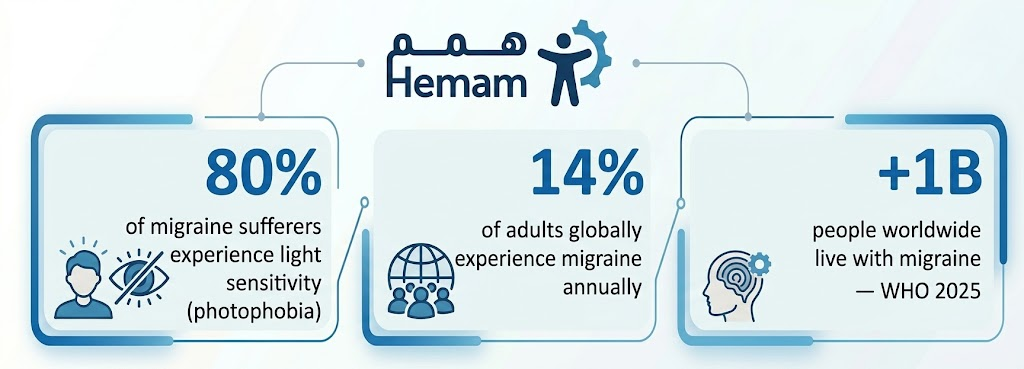
Sources: WHO 2025 – Children’s Hospital of Philadelphia 2025
I. What Makes a Screen Painful?
The answer is written in neuroscience. Inside the retina are cells called ipRGCs, light-sensitive cells connected directly to the brain regions that generate pain during a migraine attack. These cells are particularly sensitive to a specific type of light:
- Blue-green light: the dominant wavelength emitted by smartphone, computer, and LED screens.
- Flickering or pulsing light: animations, GIFs, autoplay video.
- High-contrast repetitive patterns: parallel lines, grids, rapid alternations between black and white.
- Very high luminance: bright white backgrounds in a dark environment.
Source: Harvard Medical School / National Headache Foundation — “Light and Headache Disorders”
In other words: many common design choices – blinding white backgrounds, looping animated elements, sliding carousels – are precisely what sends a user with migraine to close the page and press their hand to their temple.
II. A Single Moment From His Day
Imagine this:
| 2:30 PM |
| Opens a government service website to renew a document. The screen is brilliant white. An animated banner cycles at the top. The body text is thin with low contrast. Yellow text on a white background. After two minutes, a faint pulse begins behind the left eye. By minute three, the tab is closed. The task is unfinished. The pain has started. |
That person didn’t leave you a note. Didn’t file a complaint. Didn’t rate the experience. They just left, and you’ll encounter them in your reports as “a user who exited after two minutes” with no context.
III. The Most Common Digital Triggers and What Can Be Changed
| Trigger | What happens to the patient? | Design solution |
| ⚪ | 100% luminance white background | Dark mode or brightness reduction to 90–95% |
| 💙 | Blue light emission from screen | Blue light filter, shift palette toward warm tones |
| ⚡ | Looping animation and GIFs | Stop motion via prefers-reduced-motion |
| ▓ | High-contrast geometric patterns | Avoid repetitive patterned backgrounds |
| 💡 | Sudden shift from dark to bright page | Gradual transition between lighting states |
| 🔤 | Thin text on a light background | Increase font weight, contrast ratio to 4.5:1 or above |
IV. This Isn’t Just a Visual Concern, It’s a Design Differentiator
“Blue light generates stronger electrical signals in the retina, and greater activation in the visual cortex compared to other wavelengths.”
Study: The Cognitive Toll of Digital Overuse on Migraine — Cureus Journal
The issue doesn’t stop at visual design. A user in the middle of a migraine episode also needs simplified content without cognitive pressure, easy navigation without complexity, and a calm experience without flashing or visual chaos. All of these are elements of inclusive design, not luxuries.
V. What Hemam Tools Offer This Segment
Hemam Tools weren’t built only for people with declared disabilities; they were built for everyone who finds the default screen a challenge. That includes people with migraine:
| What Does Hemam Tools Offer Migraine Sufferers? |
| 🌙 Dark Mode: converts backgrounds to dark and reduces the blue light emitted by the page. |
| ⏸ Stop Animations: pauses all moving content on the website with a single tap, including GIFs and auto-play slides. |
| 🔆 Contrast Softening: reduces glaring white backgrounds and smooths harsh color transitions. |
| 🔤 Text Scaling and Weight: reduces reading effort and eases visual strain on the eye. |
| 🧘 Focus Mode: hides sidebar elements, ads, and distracting content, keeping only the essentials visible. |
| ✋ Full User Control: the person activates what they need, when they need it, without touching device settings. |
The core advantage: all of these tools operate client-side, in real time, without changing anything in the original website. The designer doesn’t sacrifice their visual vision, and the user doesn’t sacrifice their comfort.
The Bottom Line: Every Silent Exit Has a Story
The user who closed your website after two minutes may not have been disinterested. They may have been in pain. And they might have completed their task if the page had been a little less bright, a little less animated, a little easier on the eyes.
Migraine is a condition of large numbers: over a billion people, 14% of adults, the second leading cause of disability worldwide. This is a segment that deserves designers to ask: “Did we design this page for you too?”
Migraine doesn’t impair the ability to think or care — it’s impaired by the screen that wasn’t designed with care.
Your website can be different, with a single line of code that puts the user in control.
Find out how at hemam.io