What is WCAG and Why It Matters for Inclusive Websites

In a digital world that thrives on information and speed, one principle must remain at the core of every website: accessibility for all.
Whether it’s a government portal, an e-commerce platform, or a university website, the web should work for everyone.

That’s where WCAG comes in. It’s not just a set of technical rules; it’s a global standard that helps bridge the digital divide.

What is WCAG?

WCAG stands for Web Content Accessibility Guidelines. It’s a comprehensive set of standards developed by the World Wide Web Consortium (W3C) to ensure that web content is perceivable, operable, understandable, and robust for users of all abilities.

WCAG helps make sure that people with disabilities – whether visual, auditory, motor, or cognitive – can access, understand, and interact with digital content without barriers.

The Four Pillars of WCAG: POUR

To understand WCAG, you must understand its foundation: the POUR principles. They define what accessible content should look and feel like.

1. Perceivable

Users must be able to perceive the information being presented.

  • Text alternatives for images
  • Captions and sign language for videos
  • Strong color contrast for readability

2. Operable

Users must be able to navigate and interact with the interface.

  • Keyboard navigation support
  • Avoiding time limits or flashing elements
  • Clear, accessible menus and buttons

3. Understandable

The content and interface must be easy to comprehend.

  • Simple, clear language
  • Logical structure and labels
  • Helpful error messages and guidance

4. Robust

Content must work reliably across different devices, browsers, and assistive technologies.

  • Compatibility with screen readers
  • Well-structured code
  • Semantic HTML usage

Why Does WCAG Matter?

✅ 1. Because Inclusion Is a Right, Not a Bonus

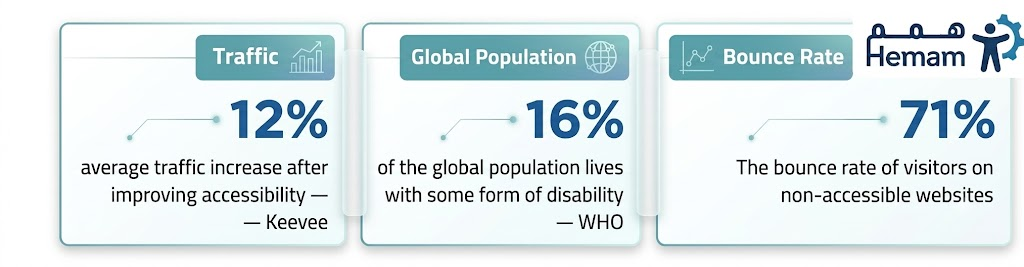
Over 1 billion people globally live with some form of disability. WCAG ensures your website speaks to all users, not just the “typical” ones.

✅ 2. Because Laws Are Evolving

Many countries, including the Gulf region, are beginning to enforce digital accessibility compliance. WCAG is the standard referenced in most regulations.

✅ 3. Because Good Accessibility = Better UX

When your website is designed for everyone, it becomes easier to use for everyone; faster navigation, clearer content, and fewer usability issues.

✅ 4. Because It Helps Your SEO

Search engines love clean, accessible websites. Features like descriptive alt text, logical headings, and structured content boost your visibility and ranking.

How Mind Rockets Helps You Achieve WCAG Compliance

At Mind Rockets, we go beyond compliance checklists. We offer real accessibility solutions that create impact, both technically and socially.

🔹 Our services include:

  • WCAG-based website audits with actionable reports
  • Custom accessibility strategy for developers and designers
  • Interactive Sign Language Avatars for on-page translation into Saudi Sign Language or Unified Arabic Sign Language
  • Consulting on accessible design and inclusive content creation

We believe digital accessibility isn’t a tech issue, it’s a human one. And we’re here to help you put inclusion into action.

Final Thought: Accessibility is Not Optional… It’s Essential

WCAG isn’t just about code. It’s about creating a digital world where no one is left behind.

Every accessible website, every inclusive decision, and every line of accessible code helps build a better web, one where diversity is embraced and supported.


Is Your Website WCAG-Compliant?

Hemam can help you assess, improve, and maintain digital accessibility – the right way.
Let’s create a digital experience that’s open to everyone.

Why Saudi Sign Language Matters for Accessible Digital Experiences

In today’s digital-first world, information is just a click away for most of us.
But for the Deaf and hard-of-hearing community, accessing online content isn’t always so simple. That’s where Saudi Sign Language (SSL) comes in.

Bringing SSL to websites isn’t just a nice gesture; it’s a powerful step toward digital inclusion and equal access for everyone.

What Is Saudi Sign Language?

Saudi Sign Language (SSL) is the official sign language used by the Deaf community in Saudi Arabia. It has its unique structure, vocabulary, and grammar, completely different from spoken Arabic or other international sign languages like ASL or BSL.

It’s not just a translation of Arabic into hand signs; it’s a full-fledged language that reflects the culture and identity of Saudi Deaf individuals.

Why Add Saudi Sign Language to Your Website?

While written Arabic is widely used online, many Deaf users consider it a second language. Reading complex text isn’t always the most effective or natural way for them to receive information.

By adding Saudi Sign Language to your website, you’re not just translating, you’re communicating directly in the language your Deaf users understand best.

Here’s what that means:

  • Better comprehension of your content and services
  • Higher engagement with your digital platforms
  • Stronger trust and connection with the Deaf community
  • Compliance with global accessibility standards (like WCAG)

How Can You Integrate SSL into Your Website?

Thanks to technology, it’s easier than ever to make your site sign-language friendly. Some of the most effective ways include:

🖥️ Sign Language Translation Widget

An on-page tool that automatically translates written content into SSL using a digital avatar, providing an instant and intuitive way to access information.

🎥 SSL Video Content

For key sections of your site, offering videos in Saudi Sign Language ensures critical messages are delivered clearly and respectfully.

📱 A Seamless User Experience

Accessibility features should be easy to use, fast-loading, and compatible across devices, giving everyone the same digital experience.

Who Benefits from This?

  • The Deaf and hard-of-hearing community, who gain direct access to information
  • Government and private institutions, by aligning with inclusion goals and regulations
  • Everyone, because accessible websites are often better-designed and easier to use for all users

Inclusion Is Not an Add-On – It’s the Foundation

Adding Saudi Sign Language to your website isn’t just about technology.
It’s about values. It says: You belong here.

Every effort to make your content more accessible sends a powerful message: one of respect, equity, and community.

Ready To Make Your Website Truly Inclusive?

At Hemam, we specialize in sign language accessibility solutions tailored for the Arab world, including Saudi Sign Language integration, avatar technology, and accessibility consulting.

Accessibility & SEO: A Powerful Duo

In today’s digital world, it’s not enough for your website to look good; it must work well for everyone.
That means thinking beyond visual design and including people of all abilities in your digital strategy. At the same time, you want your content to be visible in search engines. Here’s the good news: when you improve accessibility, you’re also boosting your SEO.

But how exactly are accessibility and SEO connected? Let’s dive in.

What Is Digital Accessibility?

Digital accessibility means building websites, apps, and online content that everyone can use, including people with disabilities.
This includes:

  • People who are blind or visually impaired
  • People who are deaf or hard of hearing
  • Users with limited mobility
  • People with cognitive or learning disabilities

To support these users, accessible websites are designed to work seamlessly with assistive technologies like screen readers, keyboard navigation, captioning tools, and sign language plugins.

What Is SEO and Why Does It Matter?

SEO stands for Search Engine Optimization. It refers to techniques used to help your website appear in search engine results, especially Google. Strong SEO means your content is more likely to be discovered by people searching for relevant information.

This involves:

  • Using the right keywords
  • Structuring your content with clear headings
  • Optimizing page speed and mobile responsiveness
  • Providing quality, well-organized content

Where Accessibility and SEO Overlap

Accessibility and SEO may seem like two different goals, one focused on humans with specific needs, and the other focused on machines (search engine crawlers). But they work hand in hand.
Here’s how:

1. Alt Text for Images

Adding alternative text helps visually impaired users understand images using screen readers. At the same time, it allows search engines to “see” your images and index them properly.

2. Headings and Structure

Using proper heading levels (H1, H2, H3…) improves page organization for screen readers – and also helps search engines understand the content hierarchy.

3. Descriptive Link Text

Links labeled “Click here” are meaningless to both users and bots. Clear, keyword-rich links like “Learn more about our accessibility services” are better for UX and SEO.

4. Clean Code and Mobile-Friendly Design

Accessible sites tend to have clean HTML and fast load times, both of which are signals Google uses to rank pages. They’re also responsive across devices – another SEO win.

Inclusive Design Is Smart SEO

When you make your website more accessible, you’re not just doing the right thing ethically – you’re making a smart business decision.

Benefits include:

  • Reaching a broader audience, including people with disabilities
  • Creating a smoother experience for all users
  • Improving your search engine visibility
  • Meeting legal or compliance requirements (like WCAG)

In short, accessible websites perform better for people and search engines.

Let’s Build a Web That Works for Everyone

Whether you’re designing a new website or improving an existing one, putting accessibility at the heart of your strategy will make your content more discoverable, usable, and inclusive.

💡 Want to improve both your SEO and accessibility?

At Mind Rockets, we specialize in making digital platforms more inclusive, from sign language integrations to full accessibility audits.
Let’s help you build an experience that welcomes every user and performs better in search.

King Khalid International Airport Leads the Way in Digital Accessibility: A Success Story

King Khalid International Airport Leads the Way in Digital Accessibility: A Success Story

In today’s fast-moving digital world, some institutions stand out for using technology to truly serve everyone. One of the most inspiring examples is King Khalid International Airport (KKIA) in Riyadh, which became the first airport in the world to integrate a digital sign language interpreter into its website – in partnership with Mind Rockets Inc.

The Challenge: Creating a Truly Inclusive Travel Experience

Airports can be overwhelming environments, especially for the deaf and hard of hearing, who often face difficulty accessing spoken or written information during their travel journey. KKIA set out with a bold goal: to ensure its digital platforms were fully inclusive and accessible to all travelers, regardless of their hearing ability.

The Solution: Technology for Inclusion

In 2021, KKIA launched a pioneering initiative in partnership with Mind Rockets: the integration of a digital sign language avatar on its official website, making it the first airport worldwide to offer this service.

This innovative tool:

  • Automatically translates text content into Saudi Sign Language through an on-screen avatar.
  • Works seamlessly across devices and browsers.
  • Requires no app downloads or complicated setup – just one click.

Taking Innovation Further: Flight Notifications in Sign Language

In 2022, KKIA raised the bar again by launching real-time flight notifications in sign language via popular platforms like WhatsApp and Twitter, another global first.
This solution allows deaf travelers to receive instant updates about departures, arrivals, and gate changes in their native sign language, improving confidence and independence throughout the airport experience.

The Results: Measurable Impact and National Recognition

KKIA’s inclusive approach led to:

  • Immediate improvements in user experience for deaf and hard-of-hearing passengers.
  • National recognition, with the airport receiving the award for “Best Accessible Airport” from the King Salman Center for Disability Research.
  • A strengthened position as a digital transformation leader among government institutions in Saudi Arabia.

Key Takeaways from This Success

This collaboration demonstrates the value of:

  • Making accessibility a core part of digital transformation, not just a nice-to-have.
  • Leveraging private sector innovation to drive social impact.
  • Creating tech solutions that benefit not just specific communities, but enhance the experience for everyone.

Toward a More Inclusive Digital Future

At Mind Rockets, we believe every digital platform – whether a website or portal – should be accessible in the language people understand best, including sign language.

Our work with King Khalid International Airport is more than a case study. It’s a blueprint for how inclusive innovation can drive real change in society.

Ready to make your platform accessible in sign language?

Contact us today to learn how Hemam can help your organization build a more inclusive, user-friendly digital experience.

Copyright © 2026 Mind Rockets Inc.